As the Mac is still unavailable and in the tradition of making my Windows PC a good back-up work machine, I decided to instal the ANTLR parser generator . This took place in several steps.
Installation of ANTLR itself
The download page of the ANTLR site has the information required to set up ANTLR, though it’s not as clearly laid out as one might like, in terms of page structure.
Here’s what we’re told in summary: ‘All users should download the ANTLR tool itself and then choose a runtime target below, unless you are using Java which is built into the tool jar.’ Clicking the link downloads the file antlr-4.10.1-complete.jar.
Of the available run-time targets, only Python was really viable for me. So, as per instructions, I ran a Powershell as administrator and issued the command pip install antlr4-python3-runtime. While this worked fine, I was also advised that pip was out of date and encouraged to update it, which I did. The output follows below.
Python 3 run-time installation output
pip install antlr4-python3-runtime
Collecting antlr4-python3-runtime
Downloading antlr4-python3-runtime-4.10.tar.gz (116 kB)
|████████████████████████████████| 116 kB 1.1 MB/s
Using legacy 'setup.py install' for antlr4-python3-runtime, since package 'wheel' is not installed.
Installing collected packages: antlr4-python3-runtime
Running setup.py install for antlr4-python3-runtime … done
Successfully installed antlr4-python3-runtime-4.10
WARNING: You are using pip version 21.1.1; however, version 22.2.2 is available.
You should consider upgrading via the 'c:\program files\python39\python.exe -m pip install --upgrade pip' command.
Pip ugrade output
This got a little messy, as you can see, but it got done.
c:\program files\python39\python.exe -m pip install --upgrade pip
c:\program : The term 'c:\program' is not recognized as the name of a cmdlet, function, script file, or operable
program. Check the spelling of the name, or if a path was included, verify that the path is correct and try again.
At line:1 char:1
+ c:\program files\python39\python.exe -m pip install --upgrade pip
+ ~~~~~~~~~~
    + CategoryInfo          : ObjectNotFound: (c:\program:String) [], CommandNotFoundException
    + FullyQualifiedErrorId : CommandNotFoundException
PS C:\WINDOWS\system32> pip install --upgrade pip
Requirement already satisfied: pip in c:\program files\python39\lib\site-packages (21.1.1)
Collecting pip
Downloading pip-22.2.2-py3-none-any.whl (2.0 MB)
|████████████████████████████████| 2.0 MB 1.3 MB/s
Installing collected packages: pip
Attempting uninstall: pip
Found existing installation: pip 21.1.1
Uninstalling pip-21.1.1:
Successfully uninstalled pip-21.1.1
ERROR: Could not install packages due to an OSError: [WinError 5] Access is denied: 'C:\Users\k\AppData\Local\Temp\pip-uninstall-pnbcktle\pip.exe'
Consider using the --user option or check the permissions.PS C:\WINDOWS\system32> cd \
PS C:> cd '.\Program Files\'
PS C:\Program Files> cd .\Python39\
PS C:\Program Files\Python39> python.exe -m pip install --upgrade pip
Requirement already satisfied: pip in c:\program files\python39\lib\site-packages (22.2.2)How to use ANTLR?
The download page suggested visiting the ‘read-me’ on github, which I did, following which I opened the ‘Getting started’ page . In the ‘Windows’ section, things got a little more explicit; here was the workflow:
- it was suggested to place the original ANTLR download in a suitable directory such as
C:\Javalib. Ok, all things being equal, I created that directory and moved the file over - I added
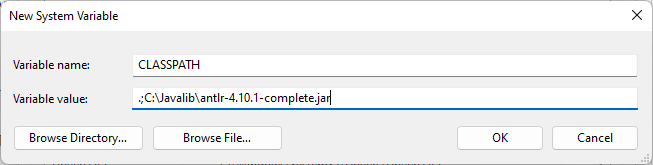
antlr-4.10.1-complete.jarto the CLASSPATH environment variable, which I created as a system-wide
- create
antlr4.batin some directory accessed by the PATH variable (I used a newly createdC:\Bat, which I added to the system path)java org.antlr.v4.Tool %* - create grun.bat in a similar way
@ECHO OFF
SET TEST_CURRENT_DIR=%CLASSPATH:.;=%
if "%TEST_CURRENT_DIR%" == "%CLASSPATH%" ( SET CLASSPATH=.;%CLASSPATH% )
@ECHO ON
java org.antlr.v4.gui.TestRig %*
Testing
Installation test
As suggested, I ran the command java -jar /usr/local/lib/antlr-4.10.1-complete.jar from the command line to check the installation. Apparently, my Java version (only just installed, so latest) was too old??
java org.antlr.v4.Tool
Error: A JNI error has occurred, please check your installation and try again
Exception in thread "main" java.lang.UnsupportedClassVersionError: org/antlr/v4/Tool has been compiled by a more recent version of the Java Runtime (class file version 55.0), this version of the Java Runtime only recognizes class file versions up to 52.0
at java.lang.ClassLoader.defineClass1(Native Method)
at java.lang.ClassLoader.defineClass(Unknown Source)
at java.security.SecureClassLoader.defineClass(Unknown Source)
at java.net.URLClassLoader.defineClass(Unknown Source)
at java.net.URLClassLoader.access$100(Unknown Source)
at java.net.URLClassLoader$1.run(Unknown Source)
at java.net.URLClassLoader$1.run(Unknown Source)
at java.security.AccessController.doPrivileged(Native Method)
at java.net.URLClassLoader.findClass(Unknown Source)
at java.lang.ClassLoader.loadClass(Unknown Source)
at sun.misc.Launcher$AppClassLoader.loadClass(Unknown Source)
at java.lang.ClassLoader.loadClass(Unknown Source)
at sun.launcher.LauncherHelper.checkAndLoadMain(Unknown Source)
I put a query out on StackOverflow , and discovered that a different version of Java altogether was required . There are zip and msi versions of the installer; it turns out that the zip requires one to manually move the run-time to some location and set the path accordingly; and I also had to run the Java uninstal tool to get rid of the unwanted version .
This solved the problem!
java org.antlr.v4.Tool
ANTLR Parser Generator  Version 4.10.1
 -o ___              specify output directory where all output is generated
 -lib ___            specify location of grammars, tokens files
 -atn                generate rule augmented transition network diagrams
 -encoding ___       specify grammar file encoding; e.g., euc-jp
 -message-format ___ specify output style for messages in antlr, gnu, vs2005
 -long-messages      show exception details when available for errors and warnings
 -listener           generate parse tree listener (default)
 -no-listener        don't generate parse tree listener
 -visitor            generate parse tree visitor
 -no-visitor         don't generate parse tree visitor (default)
 -package ___        specify a package/namespace for the generated code
 -depend             generate file dependencies
 -D<option>=value    set/override a grammar-level option
 -Werror             treat warnings as errors
 -XdbgST             launch StringTemplate visualizer on generated code
 -XdbgSTWait         wait for STViz to close before continuing
 -Xforce-atn         use the ATN simulator for all predictions
 -Xlog               dump lots of logging info to antlr-timestamp.log
 -Xexact-output-dir  all output goes into -o dir regardless of paths/package
Practical test
Next, I set up the little test programme as suggested and saved it (hello.g4) in a temporary directory.
// Define a grammar called Hello
grammar Hello;
r  : 'hello' ID ;         // match keyword hello followed by an identifier
ID : [a-z]+ ;             // match lower-case identifiers
WS : [ \t\r\n]+ -> skip ; // skip spaces, tabs, newlines
I navigated to the directory using Powershell and entered the following:
$ antlr4 Hello.g4
$ javac Hello*.java
hello parrt
^Z
This got me the expected output:
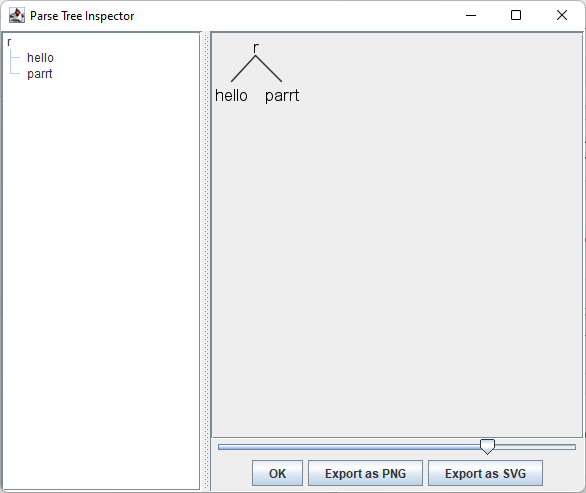
(r hello parrt)Next I tried the GUI option.
$ grun Hello r -gui
hello parrt
^Z
This got me a nice graphical representation of the same information:
All systems go!
