Today I continued working on converting my syllabus builder to run on Mac and PC from a NAS drive. The first thing I discovered was that the python-docx package was not installed. I ran into two problems while trying to remedy this.
Package channel location
First, I discovered that this package was not housed in the default ‘channels’ of conda install <package name>, and was advised to just search the Anaconda site for the package name. Doing this, I learned that the conda-forge channel had a recent version of this package, and when I clicked on the link, discovered that it could be installed with conda install -c conda-forge python-docx. Great![1]Somehow, I found this information a different way earlier, and used the longer form -channel as you’ll see from the output shown below.
But then I discovered that the conda command was only accessible when I ran the Powershell from within Anaconda … but that this didn’t give me the necessary write permissions. A Google search found the solution, however .
Issuing the command where conda from within the Anaconda-run Powershell told me where to find what I needed, and so I updated the system environment variables accordingly (see the last three lines of the screenshot below).
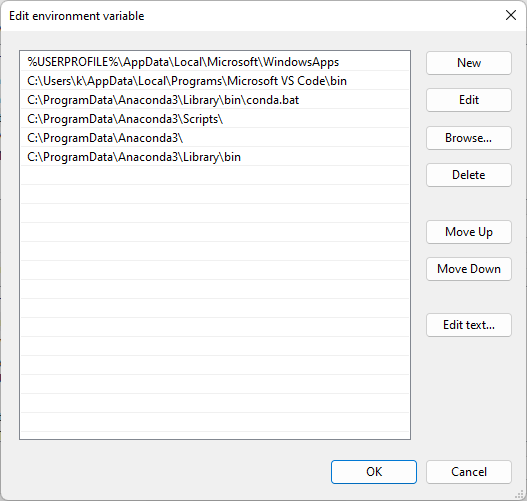
Finally, I opened a new Powershell window and ran the python-docx installation. The output is shown below.
conda install --channel "conda-forge" python-docx
Collecting package metadata (current_repodata.json): done
Solving environment: done

## Package Plan ##

  environment location: C:\ProgramData\Anaconda3

  added / updated specs:
    - python-docx


The following NEW packages will be INSTALLED:

  python-docx        conda-forge/noarch::python-docx-0.8.11-pyhd8ed1ab_0
  python_abi         conda-forge/win-64::python_abi-3.8-2_cp38

The following packages will be UPDATED:

  conda              pkgs/main::conda-4.13.0-py38haa95532_0 --> conda-forge::conda-4.14.0-py38haa244fe_0


Proceed ([y]/n)? y

Preparing transaction: done
Verifying transaction: done
Executing transaction: done
References
Footnotes
| ↑1 | Somehow, I found this information a different way earlier, and used the longer form -channel as you’ll see from the output shown below. |
|---|
